
GO54 | WhoGoHost
  • 0 Shopping Cart
  • Home
  • Store
    • Browse All
    • Linux Hosting
    • WordPress Lite
    • WordPress Hosting
    • JavaScript Hosting
    • Python Hosting
    • Reseller Packages
    • DC Google Workspace
    • Microsoft 365
    • GO54 Website Builder
    • SSL Certificates
    • Jetpack WordPress Backup
    • Managed Wordpress Support
    • Professional Email and Workspace
    • Website Security
    • Website Backup
    • Register a New Domain
    • Transfer Domains to Us
  • Announcements
  • Knowledgebase
  • Network Status
  • Affiliates
  • Contact Us
  • More
  • Account
    • Login
    • Register
    • Forgot Password?
  1. Portal Home
  2. Knowledgebase
  3. Hosting and Control Panel (cPanel)
  4. HOW TO ENABLE PHP EXTENSIONS.

  Categories

Abuse and Compliance
2
Billing
37
CloudFlare
9
CodeGuard
14
Domain Names
74
Google Workspace (a.k.a G Suite)
42
Hosting and Control Panel (cPanel)
69
Jetpack Backup
6
Managed Wordpress
9
Microsoft 365
12
Miscellaneous
5
New Account
11
Resellers
41
SiteBuilder
38
SiteLock
17
SSL Certificates
24

  Categories

  Support

Announcements
Knowledgebase
Downloads
Network Status
Open Ticket

HOW TO ENABLE PHP EXTENSIONS. Print

  • 35

To enable any PHP extensions of your choice, please follow the steps below:


1. Login to your cPanel.

2. Click on the Select PHP Version option.

3. Select Extensions and enable the extensions of your choice by ticking the necessary boxes.
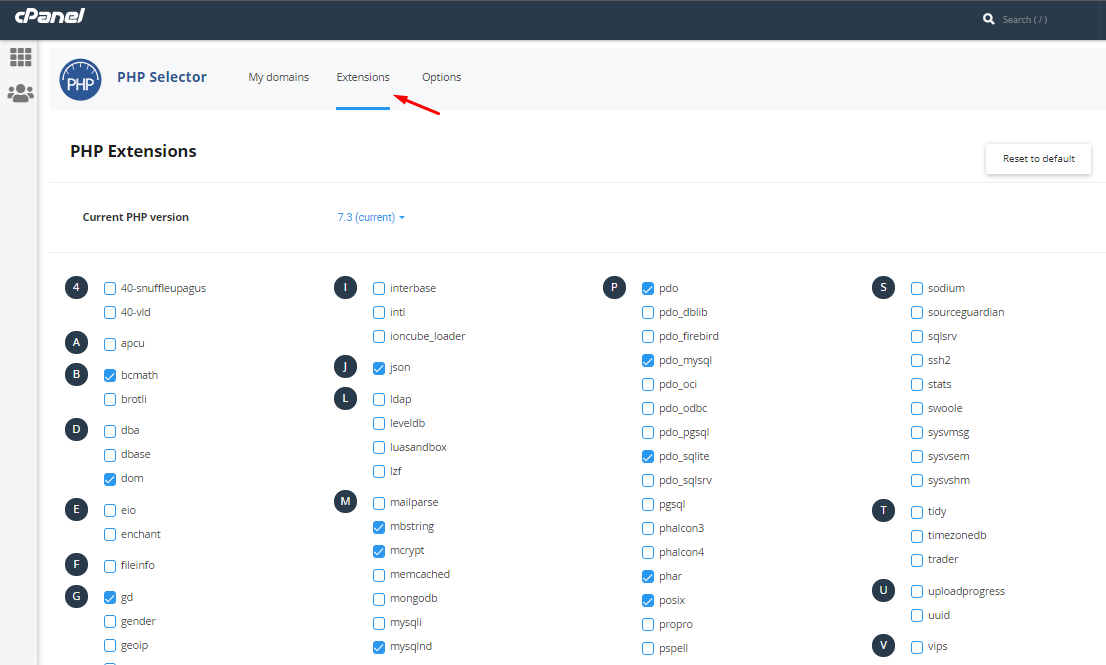
4. It saves automatically.

Alternatively, you can watch a video on how to do this:

Please send an email to support@whogohost.com if your experience any difficulty in the process.


Was this answer helpful?

Related Articles

Shared hosting limits explained Ever wondered what keeps our servers running and how we ensure that resources are fairly used and... How to upload files on your cPanel through File Manager If you do not have File Ziller downloaded on your system, you can still upload your files to your... HOW TO INCREASE UPLOAD LIMITS (MEMORY LIMIT, MAX. UPLOAD SIZE AND POST_MAX_SIZE). Steps1. Login to your cPanel 2. Search for Select PHP Version and click on it -3. Select... What is the difference between parked, addon, and subdomains? An addon domain is a fully functional domain that can be created from your cPanel. Once it's... How to change your cpanel password To change the Cpanel password of any of your accounts, you have to log into your WhoGoHost client...
« Back

  Support

Announcements
Knowledgebase
Downloads
Network Status
Open Ticket
  • Contact Us
  • Terms of Service

Copyright © 2026 GO54 | WhoGoHost. All Rights Reserved.


Loading...
Loading...

Choose Currency

N NGN
$ USD
K KES
GHc GHS

Generate Password

Please enter a number between 8 and 64 for the password length