
Creating your email accounts is fast and easy. Just follow these steps:
- Log in to your cPanel account.
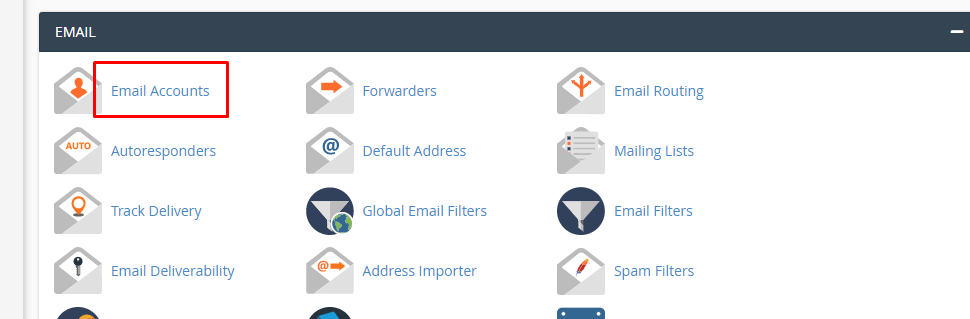
2. Navigate to Email Accounts.
3. Click on the Create button.
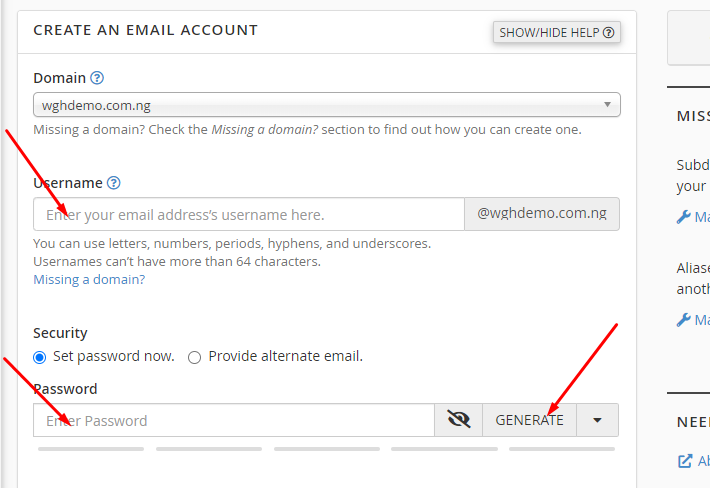
4. Fill in your preferred username and choose a strong password.
You can also use the Password Generator for extra security. Make sure to save your password safely.

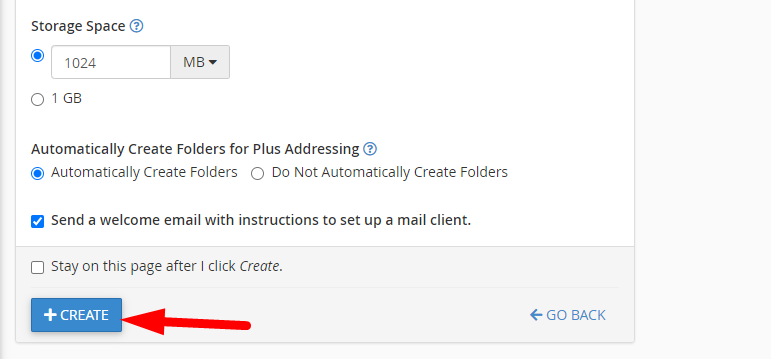
5. Hit Create, and your new email account will be ready to go.
For a visual guide, you can visit our YouTube channel to see how to create email accounts directly from cPanel.
Important Notes:
- Initially, there are no active email accounts. Even if your main cPanel username looks like an email, you must create it as a proper email account to start using it.
- Storage limits per plan:
- Aspire, Premium, Pro: 1GB
- Deluxe: 2GB
- Supreme: 3GB
- Aspire, Premium, Pro: 1GB
- Need additional storage? Upgrade to Email Hosting or G Suite plans. Visit our [Email Hosting Plans] or [G Suite Hosting Plans] for details.
